If you’re deep into AI Tools or just curious about the next wave of wearable tech, the XREAL Air 2 Pro is one of the most talked-about devices in 2026. These AR glasses promise to blend entertainment, productivity, and artificial intelligence into a single lightweight device you can wear anywhere.
But here’s the real question: are they actually useful, or just another flashy gadget?
After testing and analyzing everything from display quality to real-world usability with AI Tools, here’s the honest breakdown.
AI Tools Meet AR: What Makes XREAL Air 2 Pro Different
The biggest shift in 2026 tech isn’t just hardware, it’s how well devices integrate with AI Tools. The XREAL Air 2 Pro stands out because it’s not trying to replace your phone or laptop. Instead, it extends them.
You’re essentially getting a massive virtual screen that works with:
- AI writing tools
- AI video editors
- AI coding assistants
- Chatbots and productivity apps
This makes it especially useful if you already rely on AI for work or content creation.
Design and Comfort: Built for Everyday Use
Lightweight and Surprisingly Wearable
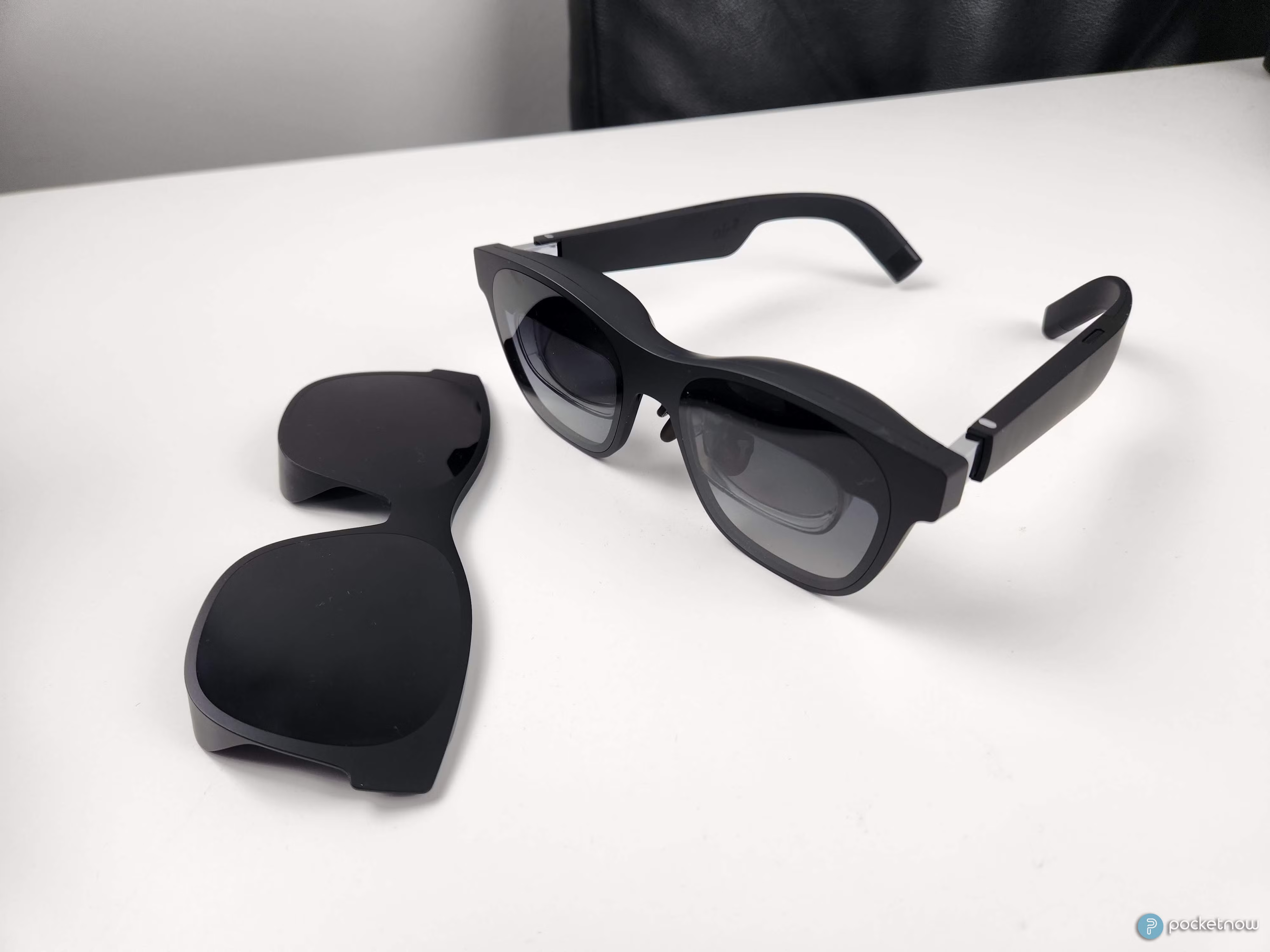
At first glance, the XREAL Air 2 Pro looks like a regular pair of sunglasses. That’s intentional. Unlike bulky AR headsets, this one is designed for daily use.
- Weight: around 75g
- Adjustable nose pads
- Comfortable for long sessions
You can easily wear it for hours without feeling like you’ve strapped a computer to your face.
Electrochromic Dimming (Game-Changer Feature)
One standout feature is the adjustable dimming. You can control how much light comes through the lenses, which matters a lot when using AI Tools in different environments.
- Bright room → dim lenses
- Dark room → clear view
This simple feature makes a huge difference in usability.
Also Read: Ray-Ban Smart Glasses Review 2026: Are They Worth It for Everyday Use?
Display Quality: A Massive Screen Anywhere
130-inch Virtual Display Experience
The XREAL Air 2 Pro projects a virtual screen that feels like a giant monitor floating in front of you.
- Full HD (1080p per eye)
- Smooth refresh rate
- Sharp text for reading and writing
For anyone using AI Tools like ChatGPT, coding platforms, or design software, the clarity is more than enough.
Perfect for Multitasking with AI Tools
You can:
- Write content with AI on one screen
- Watch tutorials on another
- Monitor analytics or dashboards
It’s like carrying a multi-monitor setup in your pocket.
Performance: How It Handles AI Tools in 2026
No Built-in OS – But That’s a Strength
The XREAL Air 2 Pro doesn’t run apps on its own. Instead, it connects to:
- Smartphones
- Laptops
- Gaming consoles
That means all your AI Tools run from your main device, while the glasses act as a display.
This actually avoids lag and performance issues common in standalone AR devices.
Best Use Cases for AI Tools
Here’s where it really shines:
1. Content Creation
Writers and bloggers can use AI Tools while enjoying a distraction-free large screen.
2. Coding
Developers get a clean, portable coding workspace anywhere.
3. Video Editing
AI-powered editing tools feel more immersive on a large virtual display.
4. Learning
You can watch AI tutorials while practicing at the same time.
Audio and Immersion
The built-in speakers are surprisingly decent.
- Directional audio
- Minimal sound leakage
- No need for headphones in quiet spaces
It’s not cinema-level, but good enough for productivity and casual media use.
Compatibility: What Devices Work Best
The XREAL Air 2 Pro works best with:
- USB-C smartphones (Android)
- MacBooks and Windows laptops
- Gaming devices like Steam Deck
iPhone users can still use it, but may need adapters.
For heavy AI Tools usage, pairing it with a laptop gives the best experience.
Pros and Cons
Pros
- Lightweight and comfortable
- Huge virtual display
- Great for AI Tools workflows
- Adjustable lens dimming
- No lag (depends on your device)
Cons
- No standalone apps
- Limited iPhone compatibility
- Requires external device
- Not ideal for outdoor walking use
Battery and Power
The glasses don’t have their own battery. They draw power from the connected device.
This means:
- No charging needed for the glasses
- But your phone/laptop drains faster
For long sessions with AI Tools, a power bank is a smart move.
Real-World Experience: Is It Actually Useful?
Here’s the honest truth.
If you’re expecting a futuristic “Iron Man” interface, you’ll be disappointed.
But if you want:
- A portable large screen
- Better focus when using AI Tools
- A cleaner workspace anywhere
Then this device delivers.
It’s not about replacing your devices, it’s about upgrading how you use them.
Who Should Buy the XREAL Air 2 Pro?
Best For
- Bloggers and content creators
- Developers and tech users
- Remote workers
- AI Tools power users
Not Ideal For
- Casual users with no need for large screens
- People expecting full AR interaction
- Those who prefer standalone devices
AI Tools + XREAL Air 2 Pro: A Powerful Combo
This is where things get interesting.
When paired with modern AI Tools, the XREAL Air 2 Pro becomes more than just a display.
You can:
- Generate content faster
- Analyze data visually
- Work anywhere without a physical monitor
It’s basically turning AI into a more immersive experience.
Final Verdict: Is It Worth It in 2026?
The XREAL Air 2 Pro isn’t perfect, but it gets one thing right: practicality.
It doesn’t try to do too much. Instead, it focuses on improving how you already use your devices, especially with AI Tools.
Rating: 8.5/10
Buy it if:
- You use AI Tools daily
- You want a portable workstation
- You value productivity and screen space
Skip it if:
- You want full AR interaction
- You don’t use external devices much